Photo Location Finder: The Ultimate Guide to Finding a Photo's Location 2025
Have you ever stumbled upon a breathtaking photo online or in your camera roll and been struck by a single, nagging question? It's a mystery many of us face—from social media users tracking down a travel spot to journalists verifying a source. The core challenge is learning how to find a photo's location, especially when the context is lost. Where was this picture from? This ultimate guide will walk you through every method, from uncovering hidden digital clues to leveraging the power of cutting-edge artificial intelligence.
We'll explore traditional techniques and introduce you to the most effective solution for getting instant, accurate answers. By the end, you'll not only have the skills to geolocate almost any image but also to truly understand the story behind the picture – transforming you into a digital detective.
Unlocking Digital Clues: EXIF Data & Geotagging
Before you start playing detective with visual clues, the answer to your location query might be hiding within the photo file itself. Many digital images contain a treasure trove of information called metadata, and understanding it is the first step in professional photo geolocation.

What is EXIF Data and Why Does It Matter?
EXIF (Exchangeable Image File Format) data is a set of information automatically embedded into a photo file by the camera or smartphone that took it. Think of it as a digital fingerprint. This data can include the camera model, settings like aperture and shutter speed, the date and time the photo was taken, and most importantly for our purpose, precise GPS coordinates. If a photo contains this photo metadata, finding its location can be as simple as reading the numbers.
How to View & Interpret Photo Metadata
Accessing EXIF data is easier than you might think. Most modern operating systems have built-in viewers. On Windows, you can right-click the image file, select "Properties," and go to the "Details" tab. On a Mac, open the image in Preview and select "Show Inspector" from the "Tools" menu. For mobile devices, various apps can act as an EXIF data viewer, revealing all the hidden information associated with your pictures. Once you have the GPS coordinates, you can simply copy and paste them into any online mapping service to see the exact spot.
Geotagging: The Automatic Location Stamp
Geotagging is the process of adding geographical identification metadata to media. Most modern smartphones automatically do this by default whenever you take a picture, assuming you have location services enabled for your camera app. This automatic stamp is incredibly useful for organizing your own photos, but it’s a critical piece of evidence when trying to locate a photo from an unknown source. However, be aware that many social media platforms strip this data upon upload to protect user privacy, which is where other methods become essential.
Manual & Deductive Techniques for Photo Geolocation
What happens when a photo has no EXIF data or it has been scrubbed clean? This is where your observational skills come into play. Manual geolocation is a fascinating process that combines keen observation with powerful online tools.

The Art of Visual Clue Analysis: Landmarks & Landscape
Every photo contains clues. The goal is to find unique identifiers that can help you narrow down the location. Look for:
- Landmarks: Famous buildings, monuments, or bridges are the easiest clues.
- Text: Signs, storefronts, or license plates can reveal a language, city, or even a specific street.
- Nature: The type of vegetation, the position of the sun, or distinctive geological formations can hint at a specific region or climate.
- Architecture: Building styles can often be traced back to a particular country or historical period.
By piecing these visual clues together, you can form a hypothesis about the photo's origin.
Leveraging Reverse Image Search for Contextual Clues
A reverse image search is a powerful technique where you upload an image to a search engine to find similar images and the web pages they appear on. Tools like Google Images or TinEye can be invaluable. If the photo has been published online before, you might find an article, blog post, or social media caption that explicitly states the location. This can provide the context you need to confirm your visual analysis or give you a starting point when you have no other leads.
Using Online Maps & Satellite Imagery for Verification
Once you have a potential location from your visual analysis or reverse image search, it's time for verification. Use tools like Google Maps, Google Earth, or other satellite imagery services. You can use Street View to virtually "walk" around the area and match the landmarks, buildings, and street layouts from your photo. This final step is crucial for confirming your findings with a high degree of confidence and completing your image verification process.
AI Photo Location Finder: The Future of Image Geolocation
While manual methods are effective, they can be time-consuming and require a great deal of skill. What if there was a tool that could automate the entire process, combining the data analysis of an EXIF reader with the observational power of a seasoned investigator? That’s where AI comes in.
An AI image search for location goes beyond simple metadata. It analyzes the pixels of the photo itself to identify landmarks, architectural styles, and environmental features, cross-referencing them against a massive global database. This is the new frontier of geolocation.

How AI Goes Beyond EXIF Data for Pinpoint Accuracy
The biggest advantage of an AI-powered tool is its ability to find a location even when there is no GPS data. Our photo location finder uses a sophisticated hybrid engine. It first checks for EXIF data for a quick and easy win. If none exists, our AI model takes over, scanning for visual clues that a human might miss. It can distinguish between the Eiffel Tower in Paris and its replica in Las Vegas or identify a specific mountain range based on its unique silhouette, delivering pinpoint accuracy.
The Transparent AI: Understanding How Our Tool Works
Trust is paramount, especially when dealing with data analysis. That's why Photo Location Finder was built with a unique transparent reasoning process. As our AI analyzes your image, it shows you the steps it's taking in real-time—from "Scanning for EXIF Data" to "Identifying Visual Landmarks." When it presents a location, it also provides a confidence score and lists the key visual elements it used to make its decision. This transparency not only builds trust but also helps you understand how the conclusion was reached.
Step-by-Step: Using Photo Location Finder for Instant Results
Ready to find the location of your mystery photo in seconds? Our tool makes it incredibly simple.
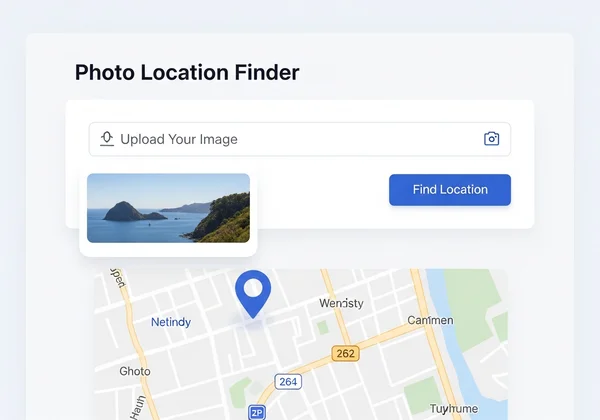
- Upload Your Image: Go to our homepage and drag-and-drop your photo into the upload box.
- Start the Analysis: Click the "Find Location" button to unleash the power of our AI.
- See the Results: In moments, you'll see the most likely location pinned on an interactive map, complete with detailed analysis and coordinates.
It's the fastest and most comprehensive way to get image location details without the hassle.
Empowering Your Photo Discoveries: Never Ask "Where Was This Photo Taken?" Again
From the hidden coordinates in EXIF data to the subtle clues in a landscape, the methods for finding a photo's location are more accessible than ever. While manual techniques are rewarding, the speed, accuracy, and power of AI have revolutionized the process. You no longer have to spend hours searching for answers.
No longer will you be left wondering about a photo's origin. With a powerful, transparent tool like Photo Location Finder, your curiosity can quickly lead to clarity, allowing you to verify information, satisfy your intrigue, or simply revisit cherished memories. Ready to unlock the full potential of your images? Upload a photo today and effortlessly uncover the 'where' behind any picture.
Frequently Asked Questions About Photo Location Finding
Can I find a photo's location if it has no GPS data?
Absolutely. While GPS data (geotags) in the EXIF file is the easiest way, its absence is a common problem. This is where an advanced tool excels. Our AI-driven image location finder analyzes visual content like landmarks, text, and environmental features to determine the location even without any metadata.
How accurate are AI photo location tools like Photo Location Finder?
Accuracy is very high, especially for photos containing distinct features. Our AI is trained on a vast dataset of global imagery, allowing it to recognize locations with impressive precision. To ensure you can trust the results, we provide a confidence score and a transparent breakdown of the AI's reasoning, so you always know how the conclusion was reached.
What is EXIF data and is it safe to share photos containing it?
EXIF data is metadata automatically added to your photos, which can include sensitive information like the time, date, and GPS location of where it was taken. While useful, it can be a privacy concern. Most social media sites remove this data automatically, but if you're sharing photos directly, you may want to use a tool to scrub the metadata first.
How can Photo Location Finder help me verify an image's origin?
Verification is a core use case. For journalists, researchers, or anyone wanting to combat misinformation, our tool is invaluable. By uploading an image, you can quickly confirm if the claimed location matches the actual location identified by our AI. The transparent reasoning process provides the evidence needed for a reliable fact-check.