EXIF Data Explained: Your Guide to a Photo Location Finder & Hidden Details
Have you ever looked at a photo and wondered about its secret story? Beyond the pixels and colors lies a hidden layer of information – a digital fingerprint that can reveal when, how, and even where it was taken. This treasure trove of details is called EXIF data. Let's demystify this powerful component of your digital images. Understanding it is the first step in answering the ultimate question: how does a photo location finder work?
Every digital image you capture carries this metadata, but few people know how to access or interpret it. This guide will walk you through everything you need to know, from reading the data to understanding its limitations. And for those times when the data is missing, we'll explore how modern technology provides a powerful solution. Ready to unlock your photos' hidden secrets? You can try our AI photo location finder to see this data in action.
Understanding EXIF Data: What It Is and Why It Matters
EXIF, which stands for Exchangeable Image File Format, is a standard that specifies the formats for images, sound, and ancillary tags used by digital cameras, smartphones, and scanners. Think of it as a detailed logbook automatically attached to every picture you take. This information is incredibly valuable for photographers, investigators, and anyone curious about the context of an image.
This metadata provides a complete technical background of the photo, which is crucial for professional photographers looking to replicate a shot or for forensic analysts verifying an image's authenticity. For the average user, it's a fantastic way to organize photo albums and recall precious memories with perfect clarity.

The Digital Fingerprint: What Information Does EXIF Data Contain?
The amount of information stored in EXIF data can be astonishing. It goes far beyond a simple file name, creating a comprehensive digital fingerprint for each image. Key details often include:
- Camera Information: The make and model of the camera or smartphone used.
- Camera Settings: Technical details like aperture, shutter speed, ISO, focal length, and whether the flash was used. This is invaluable for photographers learning their craft.
- Date and Time: A precise timestamp of when the photo was taken, down to the second.
- GPS Coordinates: If the camera's location services were enabled, the EXIF data will contain the exact latitude and longitude of where the photo was shot.
- Image Orientation: Information on whether the photo was taken in portrait or landscape mode, allowing software to display it correctly.
The Role of EXIF in Geotagging and Photo Location Finding
The most compelling piece of information for many is the location. Geotagging is the process of adding geographical identification data to media. When your camera or phone saves GPS coordinates to a photo's EXIF data, it is essentially geotagging it.
This feature is the simplest answer to the question, "where was this picture from?" By extracting these coordinates, you can place the photo on a world map with incredible precision. It’s the foundational technology behind the location-aware albums on your phone and the interactive travel maps created by bloggers. It’s a direct, data-driven way to find a photo location without any guesswork.
How to Read EXIF Data: Your Guide to Photo Metadata Viewers
Accessing this hidden information is easier than you might think. You don't need to be a tech wizard; you just need to know where to look. Most modern operating systems have built-in tools to view this data, and numerous online solutions offer even more detailed insights.
Understanding how to use a photo metadata viewer is a fundamental skill for anyone serious about image analysis or digital photography. Whether you're on a desktop computer or a mobile device, the tools are readily at your fingertips.
Viewing EXIF Data on Different Platforms (Windows, Mac, Mobile)
Getting to the EXIF data is a straightforward process on most devices. Here’s a quick breakdown:
-
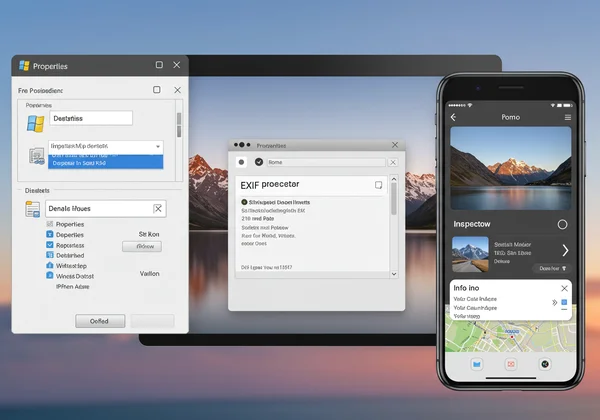
On Windows: Simply right-click on an image file, select "Properties," and then navigate to the "Details" tab. You'll see a scrollable list of all the EXIF metadata.
-
On macOS: Open the image in the Preview app. Go to "Tools" in the menu bar and select "Show Inspector." Click on the "i" icon, and then the "Exif" tab to see the details.
-
On Mobile (iOS & Android): In your phone’s default photos app, you can often find photo details by swiping up on an image or tapping an "info" or "details" button. This will usually display the date, time, and a map if location data is present.
Online Photo Location Finder Tools: Fast & Free EXIF Viewers
While built-in viewers are convenient, dedicated online tools often provide a more comprehensive and user-friendly experience. An online photo metadata viewer allows you to simply upload an image and see all its associated data in a clearly organized format.
These tools are perfect for quick checks without installing any software. Many, like the Photo Location Finder, are designed not just to show the data but to interpret it for you. You can upload a picture and instantly see the location plotted on a map, taking the manual work out of the process.
Pinpointing Locations: Using EXIF Data as Your Ultimate Photo Location Finder
When GPS information is present, using EXIF data to find a location is a precise science. The data provides the exact coordinates, which can then be used with any mapping service to pinpoint the spot where the photographer stood.
This method is incredibly reliable and forms the basis of many location-finding techniques. It is the gold standard for journalists, investigators, and anyone needing to verify the source of an image with a high degree of certainty. The process is simple, direct, and leaves little room for error.
Extracting GPS Coordinates from EXIF and Mapping Them
Once you have located the EXIF data using one of the methods above, look for the GPS section. You will typically find "GPS Latitude" and "GPS Longitude" values. These can be in a few different formats, but they are most often in degrees, minutes, and seconds (DMS) or decimal degrees.
To map them, you can simply copy and paste these coordinates into a search bar on Google Maps or another mapping service. The map will immediately center on the exact location, solving the mystery of where the photo was taken. Our Photo Location Finder tool automates this entire process, extracting the coordinates and displaying them on an interactive map for you.
When EXIF Data Isn't Enough: Limitations and Alternatives
Here’s the critical catch: EXIF data is not foolproof. There are many scenarios where it can be incomplete or entirely missing:
- Privacy Stripping: Many social media platforms (like Facebook, Instagram, and X) automatically remove EXIF data from uploaded images to protect user privacy.
- Location Services Off: The user may have disabled location services on their camera or smartphone, meaning GPS coordinates were never recorded.
- Older Digital Cameras: Many older digital cameras did not have built-in GPS capabilities.
- Manual Removal: Users can intentionally remove metadata using specialized software.
So, can AI find a location from a photo when EXIF fails? Absolutely. This is where modern technology shines. AI-powered photo location finder tools analyze the visual content of the photo itself—identifying landmarks, architecture, vegetation, and other visual clues—to determine the location. This AI analysis is the powerful alternative when the metadata trail goes cold.

Beyond Viewing: Editing and Removing EXIF Data for Privacy
While EXIF data is useful, it also raises important privacy concerns. Sharing a photo online with geotags enabled means you are broadcasting the exact location of where that photo was taken, which could be your home, your child's school, or another sensitive place.
Understanding how to manage your photo's metadata is a crucial part of digital literacy. Knowing when and how to remove this information gives you control over your personal data and protects your privacy in the digital world.
Why You Might Want to Remove or Edit Photo Metadata
Privacy is the primary reason for data removal. Before sharing photos publicly, especially of family or from inside your home, it's a wise precaution to strip the location data. Other reasons include:
- Correcting Information: Sometimes the timestamp or other data might be incorrect, and you may want to edit it for better organization.
- Anonymizing Sources: Journalists or activists may need to remove metadata to protect the identity and location of their sources.
Step-by-Step: Tools and Methods for EXIF Editing
Just as there are tools to view EXIF data, there are tools to edit or remove it.
-
Windows and macOS: Both operating systems offer built-in ways to remove personal information. In the Windows "Properties" > "Details" menu, you can click "Remove Properties and Personal Information." On a Mac, third-party apps like ImageOptim can strip this data.
-
Dedicated Software: Tools like Adobe Lightroom or ExifTool offer advanced capabilities for batch editing and removing metadata.
-
Online Tools: Several websites allow you to upload a photo and download a version with the EXIF data stripped.

Mastering Your Photos' Hidden Stories: The Power of EXIF and AI
EXIF data truly is the unsung hero of digital photography, providing a rich backstory for every image you capture and a direct path to its location and technical details. Yet, its reliability is conditional; when EXIF data is missing, the story seems lost.
This is where technology evolves. By combining traditional EXIF analysis with powerful AI visual recognition, tools like Photo Location Finder can solve the puzzle even when the metadata is gone. It represents the next frontier in understanding our digital world.
Are you ready to see what your photos are hiding? Upload an image today and let our hybrid engine reveal its true origin. Discover your photo's location and see for yourself how powerful this technology can be.
Frequently Asked Questions About EXIF Data
How can I view EXIF data on my photos?
You can view EXIF data by right-clicking the image file on a PC and selecting "Properties" > "Details," or by using the "Show Inspector" tool in the Preview app on a Mac. For a more comprehensive analysis and an interactive map display, you can use an online tool like ours to geolocate a photo instantly.
Is EXIF data always present in a photo?
No. While most cameras and smartphones automatically create it, EXIF data can be missing. This happens if the file is a screenshot, has been edited with software that strips metadata, or was downloaded from a social media site that removes it for privacy reasons.
Can EXIF data reveal the exact location a photo was taken?
Yes, if GPS or location services were enabled on the capturing device, the EXIF data will contain precise latitude and longitude coordinates. This is the most accurate way to pinpoint a photo's location, but it's only available if the information was recorded in the first place.
How do I remove or edit EXIF data from my pictures?
You can use built-in features on Windows or macOS to remove personal information from a photo's properties. For more control, dedicated software like Adobe Lightroom or free tools like ExifTool allow you to edit or completely strip the metadata before sharing your images online.