Photo Location Finder: How to Find Where Any Photo Was Taken
Have you ever scrolled through your camera roll or a social media feed and been struck by a captivating photo, wondering exactly where on Earth it was taken? Or perhaps you're a journalist needing to verify an image's origin or a traveler trying to retrace your steps. Learning how to find photo location is a skill that blends digital detective work with powerful technology. So, where was this photo taken? This comprehensive guide will walk you through every method, from uncovering hidden digital clues to leveraging cutting-edge AI, helping you find the most effective solution for your needs.
Uncovering Clues: Find Location from Picture Metadata
Before diving into complex analysis, the answer you're looking for might be embedded directly within the image file itself. Many digital cameras and smartphones automatically record a wealth of information known as metadata. Understanding this data is the first step in your geolocation journey.
What is EXIF Data & How to View Photo Metadata?
EXIF (Exchangeable Image File Format) data is a collection of information stored within an image file. While it includes technical details like camera model, aperture, and shutter speed, it often contains the most valuable clue of all: GPS coordinates. If location services were enabled on the device when the picture was snapped, the precise latitude and longitude are saved, making it a goldmine for finding a location. Viewing this photo metadata is simpler than you might think.
Step-by-Step: Reading EXIF Data Manually on Various Devices
You don't always need specialized software to access this information. Most modern operating systems have built-in tools to help you read EXIF data:
-
On Windows: Right-click the image file, select "Properties," and navigate to the "Details" tab. If GPS data is present, you'll see latitude and longitude information listed.
-
On macOS: Open the image in the Preview app, go to "Tools" in the menu bar, and select "Show Inspector." Click the "i" icon and then the "GPS" tab to see the location on a map if data is available.
-
On Smartphones: Both iOS and Android photo apps often display location information. In iOS Photos, swipe up on an image to see the location on a map. In Google Photos, tap the three-dot menu to view details.
Limitations of EXIF: When Metadata Isn't Enough to Geolocate
While EXIF data is powerful, it has significant limitations. Many social media platforms like Instagram and Twitter automatically strip this metadata from uploaded images to protect user privacy. Furthermore, a user may have disabled location tagging on their camera or smartphone. When you encounter an image with no GPS data, you need more advanced methods to geolocate the photo.
Advanced Geolocating: Using Visual Clues & Reverse Image Search
When metadata fails you, it's time to put on your detective hat and analyze the image content itself. The picture's visual elements hold subtle but powerful clues that can lead you to its origin. This manual approach requires patience but can be incredibly rewarding.
Reverse Image Search: How It Helps Identify Context & Origin
A reverse image search is a great starting point for images you found online. Tools like Google Images allow you to upload a photo and find other places it appears on the internet. This can lead you to an article, blog post, or social media profile that provides context or explicitly names the location. While it won't work for personal photos that have never been uploaded, it's an essential tool for verifying the source of viral images.
Becoming a Digital Detective: Identifying Landmarks, Architecture & Scenery
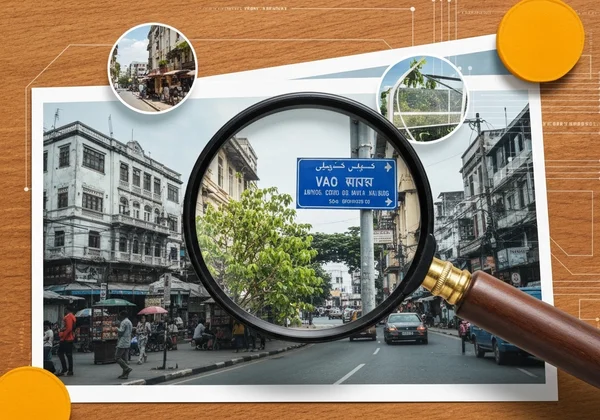
If a reverse search comes up empty, it's time for a deep visual analysis. Look closely for unique identifiers that can help you pinpoint the location. Key visual clues to search for include:
-
Landmarks: Are there any famous buildings, monuments, bridges, or natural formations?
-
Text and Language: Can you read any text on signs, storefronts, or license plates? The language and style can reveal the country or region.
-
Architecture: The style of the buildings can suggest a specific city or historical period.
-
Flora and Fauna: The types of trees, plants, and animals can narrow down the climate and geographical area.
-
Utilities and Infrastructure: Things like fire hydrants, power outlets, and traffic signs vary significantly from country to country.
The Easiest & Most Accurate Way: AI Image Location with Photo Location Finder
While manual methods are useful, they can be time-consuming and require a keen eye. Today, the most efficient and powerful way to find a photo's location is with artificial intelligence. An AI image location tool automates the entire detective process, delivering precise results in seconds.
How Our AI Finds a Location from Any Photo (Even Without GPS Data)
So, can AI find a location from a photo? Absolutely. Our platform, Photo Location Finder, was built to solve this exact problem. It uses a sophisticated hybrid analysis engine that combines the best of both worlds:
- Metadata Extraction: It first scans for any available EXIF data for an instant, precise location.
- AI Visual Analysis: If no GPS data is found, our powerful AI takes over. It analyzes every pixel to identify landmarks, architectural styles, vegetation, and other visual clues—just like a human detective, but with access to a massive global database. It then cross-references these elements to determine the most probable location.
Step-by-Step: Using Photo Location Finder for Instant Results
We designed our tool to be incredibly intuitive and user-friendly. Finding a photo's location is as simple as three steps:
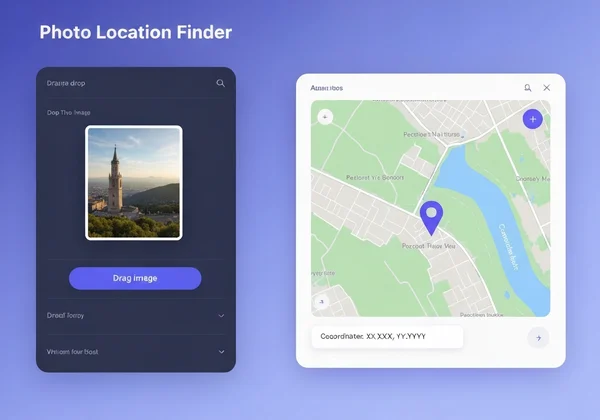
- Upload Your Image: Drag and drop your photo directly onto our homepage.
- Start the Analysis: Click the "Find Location" button to unleash the power of our AI.
- View Your Results: In seconds, you'll see the pinpointed location on an interactive map, complete with coordinates and details about how the AI reached its conclusion.
Ready to see it in action? Upload your photo and get instant results.
Why Transparency Matters: Understanding Our AI's Reasoning Process
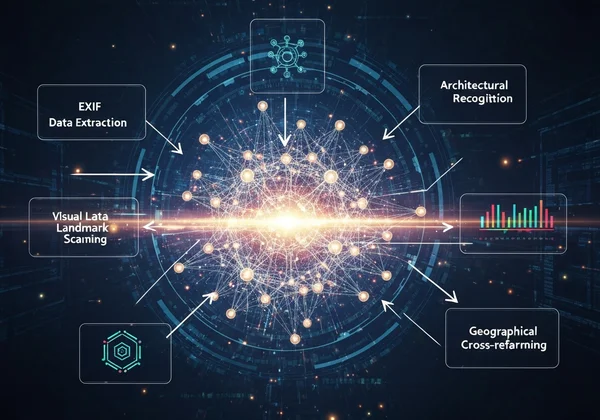
Trust is paramount when it comes to data analysis. Unlike other black-box tools, we believe in transparency. That's why Photo Location Finder includes a unique "AI Reasoning Process" feature. As the analysis runs, our tool shows you the exact steps it's taking—from "Extracting EXIF Data" to "Scanning for Visual Landmarks." This transparency not only demystifies the AI process but also gives you confidence in the accuracy and reliability of the results provided by our powerful AI.
Unlock Your Photos' Stories: The Power of AI Location Finding
From manually sifting through metadata to playing digital detective with visual clues, there are many paths to uncovering a photo's origin. However, these traditional methods often fall short when metadata is missing or clues are obscure. Technology has provided a better way.
AI-powered tools like Photo Location Finder have revolutionized the process, offering a fast, accurate, and transparent solution for everyone. Whether you're a professional journalist, a curious social media user, or simply someone trying to organize your travel memories, you now have the power to answer the question, "Where was this photo taken?" Stop wondering and start discovering. Visit our homepage to get instant results and unlock the story behind any picture.
Frequently Asked Questions About Photo Geolocation
Where was this photo taken if there's no EXIF data?
When EXIF data is missing, the best approach is to use an advanced tool that relies on visual analysis. An AI-powered service like our free tool can identify landmarks, architecture, and other environmental clues within the image to deduce its location with a high degree of accuracy.
How accurate is AI in finding a location from a photo?
The accuracy of AI geolocation is remarkably high, especially for images with distinct features. While no system is 100% perfect, our AI provides a confidence score with its results, giving you a transparent understanding of how certain it is. For photos of well-known locations, accuracy is typically spot-on.
Can I find a location from a photo taken long ago?
Yes, you can. The age of the photo doesn't matter as long as there are identifiable and relatively unchanged visual clues within it. An AI can recognize historical landmarks or architectural styles from decades ago, making it possible to locate vintage or family heirloom photos.
Is it legal or ethical to find the location of someone else's photo?
This is an important consideration. Using geolocation tools for legitimate purposes like journalism, research, or reminiscing about your own photos is perfectly fine. However, it's crucial to respect privacy and avoid using this technology for malicious activities like stalking. Always use location information responsibly.
What are the limitations of photo geolocation tools?
The main limitations are image quality and context. A blurry, low-resolution photo or a close-up shot with no background (like a picture of a plain wall) will be nearly impossible for any tool to locate. The more unique visual information an image contains, the higher the chance of a successful and accurate geolocation. Ready to test these limits? Discover its story now.